



prosilver
Админ
-
Зарегистрирован
-
Посещение
-
prosilver изменил свою фотографию
-
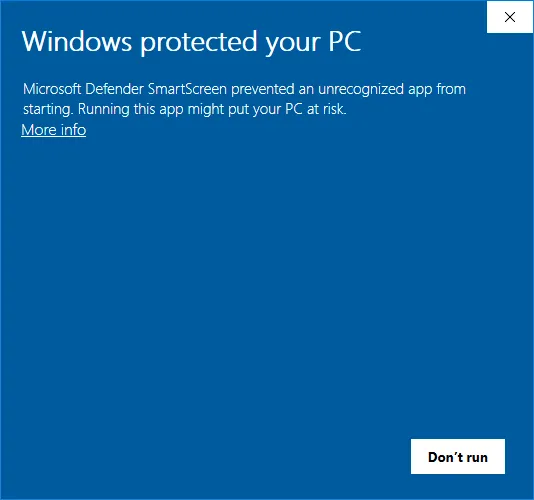
IW4x is a community-driven modification for Call of Duty Modern Warfare 2 (2009) that enhances the game with improved security, dedicated servers, and extensive modding capabilities. gameplay.mp4 Quickstart GuideIW4x is not a game on its own. It requires Call of Duty: Modern Warfare 2 (2009) to be installed. If you do not own the game yet, please first buy and install it via Steam. Iw4x needs to be installed in the same directory where Call of Duty: Modern Warfare 2 is installed. Usually, the path to this directory is: Windows C:\Program Files (x86)\Steam\steamapps\common\Call of Duty Modern Warfare 2 Linux $STEAMLIBRARY/steamapps/common/Call of Duty Modern Warfare 2 Mac ~/Library/Application Support/Steam/steamapps/common/Call of Duty Modern Warfare 2 Finding your Modern Warfare 2 installationIf you have trouble to find the install directory, you can use your Steam Library as help: Open Steam and go to your LIBRARY Right-click on Call of Duty: Modern Warfare 2 (2009) - Multiplayer Select Manage > Browse local files find_directory.B7ScCanA.mp4 Verifying Game IntegrityBefore installing IW4x, it’s a good idea to verify the integrity of your game files through Steam. This prevents errors such as ERROR: Could not find zone 'code_pre_gfx_mp.ff', when launching IW4x. Open Steam and go to your LIBRARY Right-click on Call of Duty: Modern Warfare 2 (2009) - Multiplayer Select Properties… Select Installed Files Click the button Verify integrity of game files verify_file_integrity.CZzcZmBy.mp4 Steam will check that all game files are intact and properly installed. If it finds anything missing or corrupted, it will automatically re-download the necessary files. Installing IW4xOnce you’ve located the Modern Warfare 2 game directory, you are ready install IW4x. The simplest way is by using the IW4x launcher, which will download and install all required files automatically. Get the launcher from GitHub launcher-1.1.8-b.16-x86_64-linux-glibc.tar.xz launcher-1.1.8-b.16-x86_64-windows.zip Move it into your Modern Warfare 2 directory. Double-click the launcher to start the installation. download_launcher.BEBbKy_J.mp4 Windows protected your PC Windows may display a warning the first time you run iw4x-launcher.exe. This happens simply because the file isn’t commonly seen on Windows systems (not because it’s unsafe). It’s completely normal behavior and the launcher is safe to use. If you see the warning, you can safely click on More info and then Run anyway. (And yes, the warning can be removed, but it requires a Microsoft code-signing certificate, which costs a lot of money.) Using the LauncherNote We recommend using the launcher every time you play IW4x. It will automatically download any updates, verify your installation, and start the game. Once you’ve installed IW4x, you should see the following files in your game directory: <FileTree> Call of Duty: Modern Warfare 2 iw4x/ iw4x.exe iw4x-launcher.exe … other files and folders </FileTree> Command Line Arguments (CLI)The IW4x launcher is powered by a Command Line Interface. Instead of editing a configuration file, you customize the launcher’s behavior by passing arguments to it. The most common way to do this on Windows is by creating a shortcut: Right-click iw4x-launcher.exe and select Create shortcut. Right-click the new shortcut and select Properties. In the Target field, add your desired arguments to the very end of the line (outside the quotes). Example: Loading a ModIf you want to play offline against bots using the Bot Warfare Mod, you need to pass specific arguments to the game. You can do this using the --game-args flag. Your shortcut’s Target field would look something like this: "C:\...\Call of Duty Modern Warfare 2\iw4x-launcher.exe" --game-args "-disable-mod-unloading" --game-args "+set fs_game mods/mp_bots"Now, every time you use this shortcut, the launcher will ensure your files are up to date and then automatically start the game with the Bot Warfare mod loaded! Available Launcher OptionsHere is a list of common arguments you can use to configure the launcher: Argument Description --game-args "<arg>" Additional arguments to pass to the game executable. Can be specified multiple times. --prerelease Opt-in to pre-release (beta) updates. Use this to test upcoming features before they are marked as stable. --skip-launch Skip launching the game after updating/installing. The launcher will perform all operations but exit without starting the game. --game-exe "<file>" The game executable to launch. (Defaults to iw4x.exe). --path "<dir>" The installation directory for the game files. (Defaults to the current working directory). --jobs or -j <num> The number of parallel download jobs to run. (Defaults to 99). --no-self-update Skip the automatic launcher self-update check. --self-update-only Only check for and apply launcher updates, then exit. Does not update game files. --help Show the help message and exit. --version Show version information and exit. (For advanced users: You can also easily pass these arguments using a .bat file or directly via your terminal/command prompt).
-
 Guru Groove Foundation — один из немногих отечественных коллективов мирового класса —выступит с новой программой Ballads. Специально подготовленный лайн ап из баллад, записанных на 4-х альбомах коллектива, идеально впишется в атмосферу тропической оранжереи «Аптекарского огорода».
 В 2015 году чилиец Луис Сеа, он же DJ Byte, выиграл чемпионат мира по диджеингу Red Bull Thre3style в Токио и стал лучшим диджеем в мире. С этого момента он не перестаёт путешествовать по всей планете от вечеринки к вечеринке и делать то, что ему нравится больше всего: класть пластинки на проигрыватель и заставлять людей танцевать. 20 сентября DJ Byte выступит с диджей-сетом в баре Gipsy.
 Максимальное количество работ великого Винсента Ван Гога будет представлено в ДК МИИТ. Увидеть полотна, которые находятся в музеях всего мира, сложно даже искусствоведам, а для обычного зрителя — это и вовсе невыполнимая задача. Зато полюбоваться на картины, воспроизведённые по технологии «жикле» теперь может каждый. Фактура мазков, тончайшие переходы цвета, даже эффект старения — всё это
 Увлекательная история для семейного просмотра! На сцене Московского областного театра юного зрителя пройдёт спектакль «Три поросенка». Постановка создана по мотивам старинной английской народной сказки, которую в русской версии пересказал С. Михалков. В спектакле используются яркие, красочные декорации и оригинальные сценические костюмы.
 О выставке Залы постоянной экспозиции «Дом Паустовского» трансформированы в экспозиционно-художественные модели: Город, Море, Лес, Мир и Дом. Музей не только знакомит с биографией и творчеством К.Г.Паустовского, но и погружает в мир писателя. Художественное оформление залов создает особую атмосферу времени и пространства.Welcome to Pages! Pages extends your site with custom content management designed especially for communities. Create brand new sections of your community using features like blocks, databases and articles, pulling in data from other areas of your community. Create custom pages in your community using our drag'n'drop, WYSIWYG editor. Build blocks that pull in all kinds of data from throughout your community to create dynamic pages, or use one of the ready-made widgets we include with the IPS Community Suite. View our Pages documentation





Важная информация
Используя этот сайт, вы соглашаетесь Условия использования.